

The above Catastrophic failure error sometimes happens when installing different ToolsTalk versions (or some InstallShield based installations).
Before performing the below steps, make sure that you are using a local administrator account on the computer and that you right-click on the installer to select the "Run as administrator" feature.
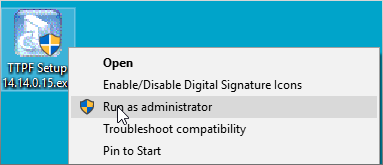
Run the installer as an administrator, when installing
If running the program as an administrator does not resolve the issue, the simplest solution seems to be the following:
1. Go to the folder C:\Program Files (x86)\InstallShield Installation Information\
2. In this folder there may be several randomly generated folder names. Click through them and "edit" the setup.ini file to find the one that names the software you are having trouble with.

There may be several folders here. Click through until you find the one you are looking for

You can identify which installer by, right-clicking and selecting "edit" for the Setup.ini file

The AppName identifies the setup folder
3. Once you have identified the folder for the software you are having trouble with (in this case ToolsTalk Power Focus). Rename the folder. Here is an example:

4. After renaming the folder, try the installer again (be sure to right-click and use the "Run as administrator" feature).
If you have any questions or still have trouble, please let us know by submitting a request or contacting your local sales representative.
Comments
0 comments
Article is closed for comments.